

 s it worth overpaying for nerd graphics on a mouse if the Linux software still isn't finished? The answer lies in the new Logitech MX Master 4 Developer Edition, which offers a familiar shape smothered in programming references. This special edition sells developer aesthetics while completely forgetting about actual Linux support. The manufacturer slaps Linux references and code snippets all over the body, but the official button-mapping utility still lacks a proper client for that operating system.
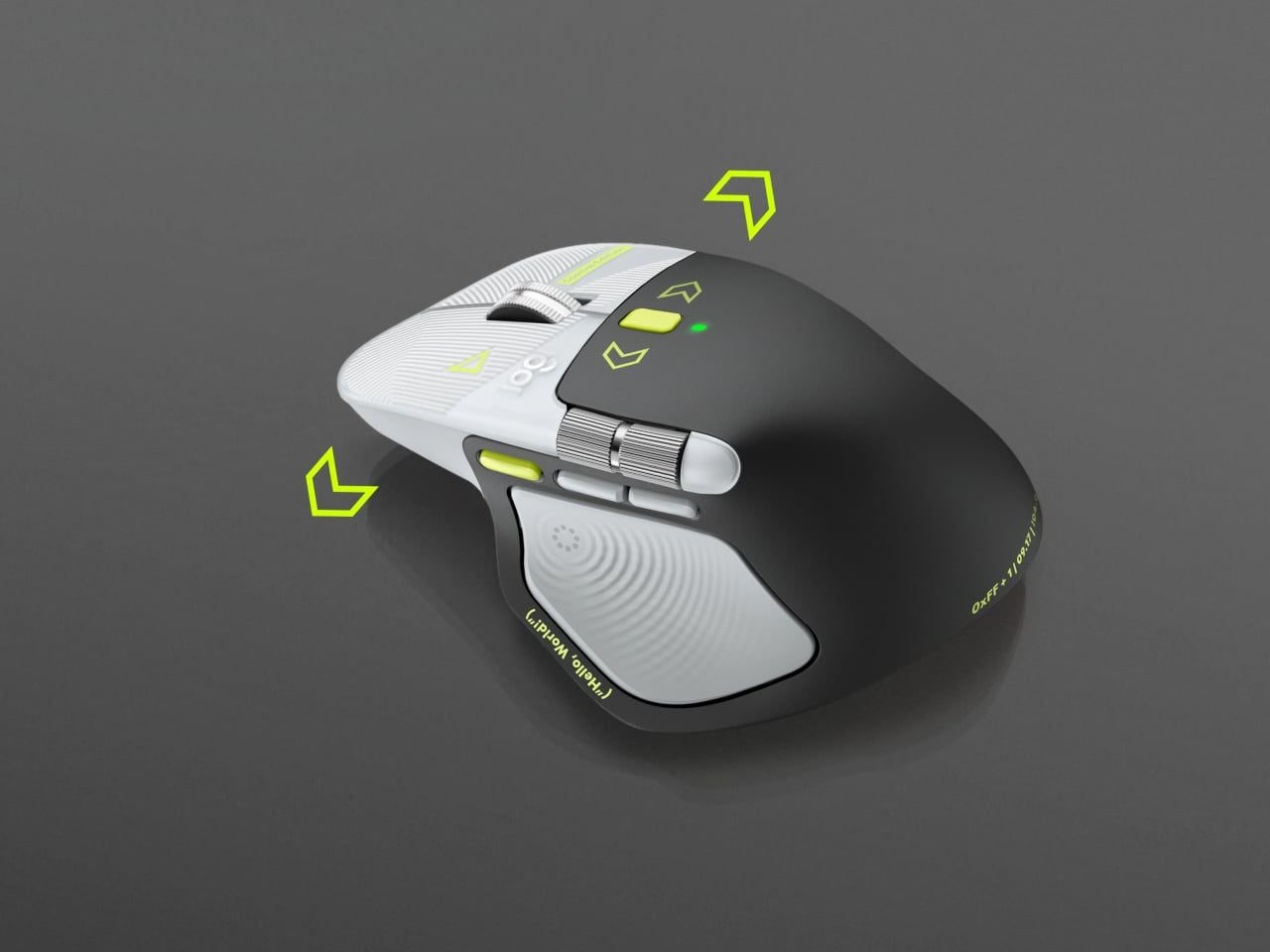
For $119.99, you get a device that looks drastically different from your standard boring office mouse. As the manufacturer claims, it combines light-gray buttons with a dark palm rest and bright lime-green accents. Thin lines resembling printed circuit boards run across the front of the body, accompanied by programming symbols right next to the controls. Anyone who has ever opened a code editor will instantly recognize these element names.
What the body markings hide and how the hardware performs
If you look closely at the details, the body features quite specific nods to software development history. A Hello, World greeting runs along the thumb rest, while formulas like 0xFF + 1 and the date 09.17 sit among the smaller markings. The manufacturer ties the latter two references to Programmer's Day and the Linux kernel release date. These drawings probably won't help you write code any faster, but they certainly make the device stand out from the sea of standard gray office mice on your desk.
Beneath this decorative styling lies the familiar ergonomic shape with a raised back and a wide thumb rest. This asymmetric body isn't ambidextrous, meaning left-handed users will still have to stare at the graphics from the wrong side. The main MagSpeed scroll wheel switches between ratchet mode and free-spin, letting you breeze through long documents or endless lines of code with equal ease.
the mouse can transmit haptic feedback for supported actions and notifications.
This vibration feedback doesn't just happen on its own; it requires setup through the official utility. Logitech lets you adjust its intensity and configure custom feedback for specific applications using the Logi Options+ software. Pressing the panel also brings up the Actions Ring menu, which surrounds your cursor with a set of quick commands and macros for repetitive tasks.
Who this special edition is for and the main catch
Herein lies the ultimate paradox of a device built for developers. Despite the Linux references slapped on the housing, Logitech couldn't be bothered to release a Linux version of the Options+ software to actually configure this entire shortcut system. Brilliant: selling a mouse aimed at Linux programmers and making them suffer without proper software support.
Since all the internal hardware completely mirrors the base MX Master 4 model, you are paying extra strictly for the visual flair and developer Easter eggs. If you care about a unique desktop colorway and are ready to tolerate the limitations of the proprietary software, this mouse will find a comfortable home under your hand. Everyone else is better off buying the standard version and skipping the markup for geeky artwork.
What doesn’t add up
An engraved release date on the plastic demands $119.99 while leaving software engineers stranded with default hardware behavior. Logitech pitches specialized desk aesthetics to programmers yet refuses to port its Logi Options+ software to the open-source platform honored on the shell. Buyers receive the standard MagSpeed hardware inside a vivid shell, entirely locked out of tailoring haptics or the Actions Ring radial menu. The device honors an operating system on its shell that its configuration software still refuses to support.