

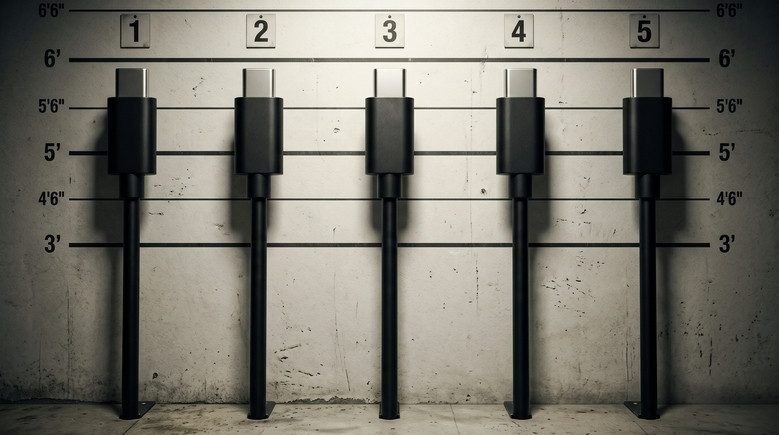
 wo black cables with identical oval plugs look completely indistinguishable from the outside, but one of them transfers data at 480 megabits per second, just like an old USB 2.0 cable from the year 2000, while the other handles 40 gigabits—roughly 83 times faster. Manufacturers rarely stamp this information on the casing, so you only find out the hard way. The universal plug created an illusion of order while hiding a massive technological zoo inside, full of wildly varying speeds and power capabilities.
The USB Type-C 1.0 specification was published by the USB-IF consortium on August 11, 2014. The promise sounded tempting: a single symmetrical 24-pin connector works for your phone, laptop, and monitor all at once. It was supposed to charge devices, transfer data, and output video simultaneously. By September 2014, the DisplayPort Alternate Mode standard arrived, allowing video signals to run through this connector, and in June 2015, Intel announced that Thunderbolt 3 would use USB-C as its sole port.
What lies inside identical wires
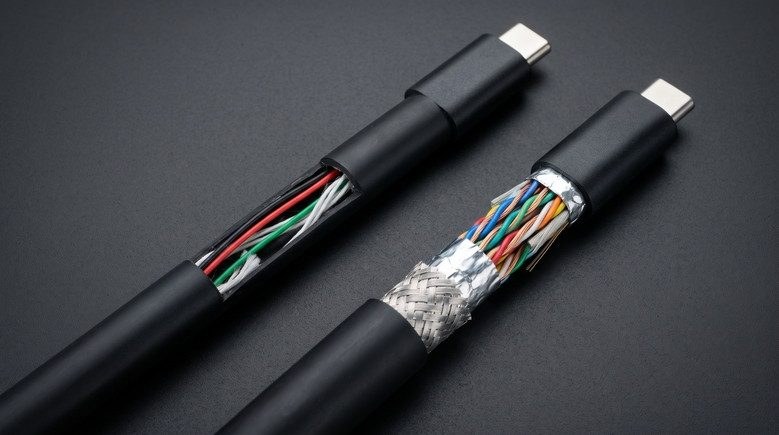
The main problem is that the connector only describes the shape of the plug and the pin layout. What actually travels through those wires is decided by other standards—USB versions, USB Power Delivery power modes, and alternative video protocols. The simplest USB-C cable is built as primitively as possible: it has wires for power and just a single data pair for USB 2.0, with zero high-speed lines. Such a wire charges your phone just fine, but copies files at early-2000s speeds.
The simplest USB-C cable by specification can be almost hollow: it contains power wires and a single USB 2.0 data pair, while high-speed pairs and service lines are completely absent.
A fully functional version is built much more complexly: all wires are routed, including those high-speed pairs for USB 3.x, USB4, video, and Thunderbolt. On the outside, these cables differ by little more than thickness, but the packaging at best bears a modest "USB-C" without a single hint of speed. What does this look like on the real market? The 2013 [sic: 2023] transition of Apple smartphones to this port laid bare all the pain of this approach. The base iPhone 15 operated on the port at USB 2.0 speeds of around 480 megabits per second, while the iPhone 15 Pro supported up to 10 gigabits. Yet Apple included a slow USB 2.0 cable in the box with the Pro, forcing you to buy a separate wire—such as Apple's $69 Thunderbolt 4 cable—to get the promised speed.
How standards changed names and confused buyers
The situation was made worse by the naming chaos orchestrated by the USB-IF consortium. It all started in 2008 with USB 3.0 at 5 gigabits per second and the marketing name SuperSpeed. In 2013, USB 3.1 arrived with 10 gigabits, retroactively turning the old USB 3.0 into USB 3.1 Gen 1, while the new one became USB 3.1 Gen 2. In 2017, history repeated itself with USB 3.2: 5 gigabits turned into USB 3.2 Gen 1, and 10 gigabits into USB 3.2 Gen 2. A new 20-gigabit mode running across two lines simultaneously via USB-C was dubbed USB 3.2 Gen 2x2. The exact same controller managed to cycle through three names in nine years without a single hardware change, and manufacturers gladly used this for marketing.
The first version of USB4 dropped in 2019 based on Thunderbolt 3, delivering up to 40 gigabits, while the second, introduced in 2022, ramps up to 80. The power story is just as tangled, because under the basic specification, any USB-C cable must handle 3 amperes at up to 20 volts—meaning 60 watts. For 100 watts, you need a 5-ampere cable, and the Extended Power Range mode from USB Power Delivery 3.1 allowed such cables to run at 48 volts and push up to 240 watts. To let the charger know what the wire can handle, a tiny e-marker chip is built into it, reporting specifications via the USB PD protocol. If that chip is missing, the charger plays it safe and refuses to output more than 60 watts.
Key takeaways
Visually identical USB-C cables hide entirely different guts and differ in speed by dozens of times due to standards confusion and a complete lack of labeling. When buying an expensive device, check the cable specs separately; otherwise, instead of fast data transfer, you'll get speeds straight out of the last century.
The catch
Why did the consortium push a single universal plug while allowing manufacturers to legally cut corners on internal wiring? The standard defined only the physical shell, letting brands hide missing high-speed data lines behind identical outer casings and bare labels. Buyers of advanced hardware face the hidden tax immediately, discovering that an iPhone 15 Pro ships with a legacy-speed cord and requires another 69 dollars for a cable capable of actual fast transfers. The universal oval connector eliminated visual clutter on retail shelves only to bury the entire mess inside identical plastic shells.
Our stories: Matty Benedetto Turns USB-C Cables Into Construction Cords (October 5); How to Check Fake Thunderbolt 4 and USB-C Cables at Home (October 18).