

 ight euros a piece on Amazon — that is exactly what the controller boards cost that were supposed to rid my desk of cable clutter. Instead of a tidy workspace, I ended up with a setup requiring two separate wires just to stay constantly charged. Trying to build a wireless split keyboard with your own hands often crashes into the hidden defects of cheap electronics, demanding endless resoldering from the owner.
I decided to share my experience turning an ergonomic wired Lily58 Pro split keyboard into a wireless format. For the first stage of the project, I picked up budget alternatives to nice!nano v2 boards running on the nRF52840 chip, which was specifically designed for low-power wireless devices with Bluetooth support and energy-efficient connection protocols. However, in practice, the circuit design quirks of cheap clones wiped out all the silicon's advantages: batteries started draining suspiciously fast due to current leaks in the power circuitry, input lags showed up, and keystrokes began doubling on their own.
The Chinese component lottery
Most of the beating hit the right half of the device: the module would work autonomously for a little while before shutting down out of nowhere. Meanwhile, the charge indicator stopped showing any signs of life, even though current was actually flowing into the battery. A genuine nightmare began when unstable power forced me to keep the gadget permanently chained to adapters.

"In the end, I gave up and put the wired controllers back in — the ones that were there before hacking the board."
Temporarily rolling back to wires saved the situation while I hunted for alternatives to replace the black boards. What do you do if you do not want to abandon the project and there are no trusted sellers?
The fix was ordering different nice!nano v2 knockoffs from AliExpress: a set of three red boards cost about 16 euros, whereas an original nice!nano controller runs about 25 to 30 dollars a piece. The price gap in components directly guts the quality of voltage regulators and charge controllers. After installing them and flashing the firmware, the sudden shutdowns stopped, key doubling vanished, and the power controller started working normally. Cheap clones from different batches behave completely unpredictably, turning your purchase into a gamble.
Software lag and the final verdict
The final hurdle was the screen: turning on the OLED displays caused a noticeable keyboard response lag. The problem lies in firmware limits and data bus bandwidth constraints when running the wireless module and rendering animations on the screens at the same time. As soon as I physically disconnected the tiny screens, typing went back to being smooth. I fixed this lag by physically unplugging the displays.
"With the OLED displays turned on, a small but quite noticeable typing lag appeared. Moreover, as soon as you physically disconnected the displays, the problem vanished."
If you stack up the time and money spent on a DIY build against ready-made wireless mechanical keyboards on the market, the picture gets more interesting. Factory models with an ergonomic split layout are rare and cost between 200 and 400 dollars, offering out-of-the-box stability while robbing you of the chance to customize every single switch. Regular mass-market wireless keyboards miss out on the anatomical hand positioning that makes projects like the Lily58 Pro worth undertaking in the first place.
Building your own wireless ergonomics looks like a cheap way to get your dream keyboard, but saving money on controllers guarantees hours of bug hunting, firmware tinkering, and resoldering. If you are not ready to mess around with microchips and the risks of defective Chinese boards, buying a ready-made factory device will save both your cash and your sanity.
What’s behind it
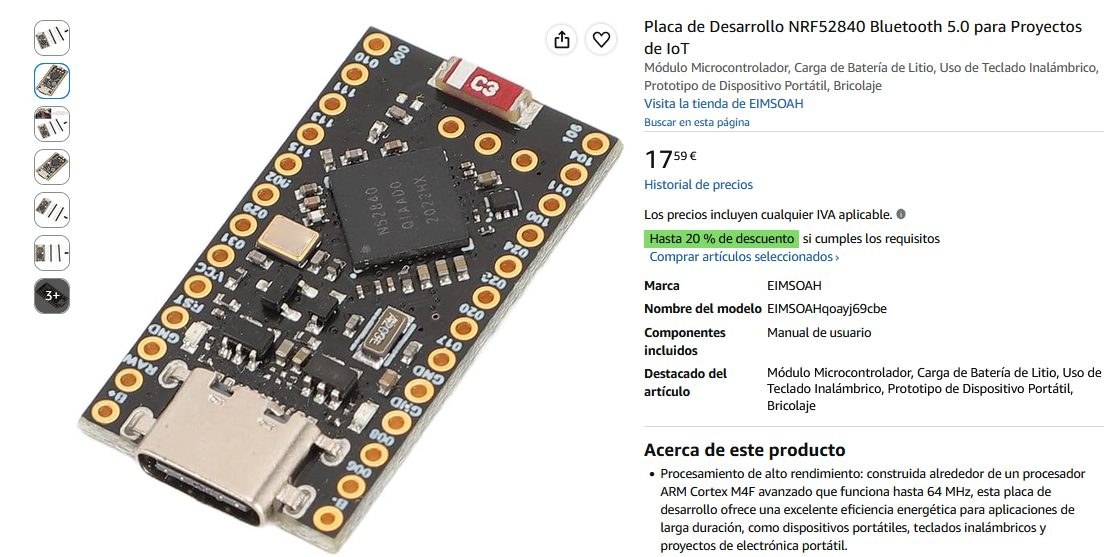
The energy-efficient nRF52840 chip was supposed to free the ergonomic split keyboard from clutter, yet it ended up tethered to two charging cables simultaneously. Cutting corners with eight-euro microcontroller clones resulted in phantom battery drains, input lag, and the forced removal of OLED screens just to maintain smooth typing. The stark price gap between these cheap boards and an authentic nice!nano controller highlights exactly where budget circuit designs compromise on power management. Will a DIY Lily58 Pro survive long-term use on budget clones, or will keeping it truly wireless inevitably drive its cost closer to original $30 controllers?