
Why Your Home Server Looks Like a Mess of Loose Wires
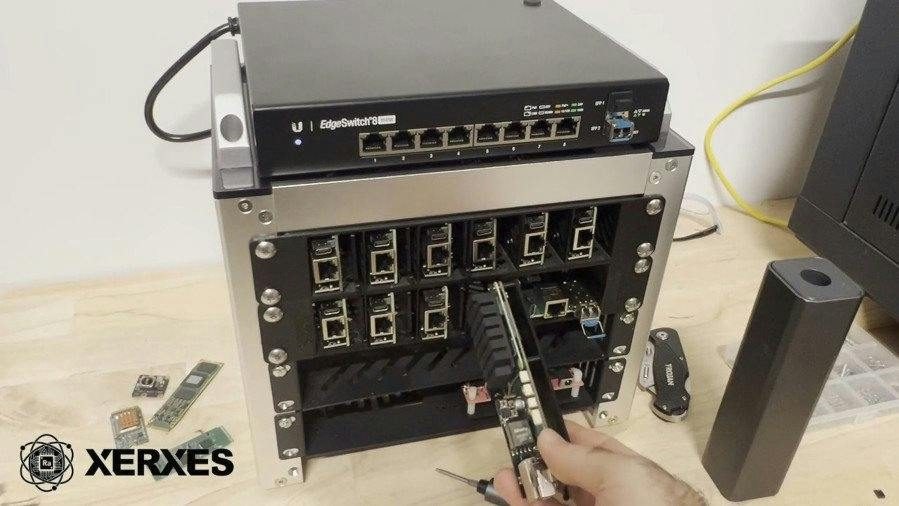
 f you have ever tried to set up a home lab for basic file sharing or light web hosting, you already know the profound agony of cable clutter. Your desk usually ends up buried under a haphazard pile of single-board computers, loose power adapters, and dangling external hard drives that slide off the edge at the worst possible moment. Engineer and computational neuroscientist Rob Newport has opened crowdfunding for a blade-style home lab setup compatible with the Raspberry Pi Compute Module 5 and NVIDIA Jetson COMs called the Xerxes Home Lab, as reported by Hackster.io.
The Xerxes Home Lab accepts either NVIDIA's Jetson family of computers-on-modules or Raspberry Pi's Compute Module 4, Compute Module 5, or third-party compatible COM depending on the model chosen. This project tries to solve a very specific, irritating headache for self-hosting enthusiasts by packing popular computing modules into a neat, professional blade format. Instead of letting your gear sprawl across a shelf like an electronics graveyard, you get a clean stack of modular computing cards that slide into a dedicated rack.
"The Xerxes Home Lab is a private, affordable, and compatible hardware platform for home lab engineers of all backgrounds"
What You Get in the Box and Where the Catch Lies
When you look past the neat industrial design, you have to ask yourself what this hardware actually delivers for your everyday projects. If you pick up the Raspberry Pi-flavored blade, you also get an expansion connector for optional mezzanine cards that brings out MIPI Camera Serial Interface and HDMI display connectivity. The NVIDIA Jetson version, meanwhile, comes with an OCuLink expansion port carrying high-speed PCI Express signals. For those who want to run on-device machine learning workloads without buying an expensive, power-hungry graphics card, Rob Newport has also designed an in-house COM based on the Rockchip RK3566, featuring four up-to-1.8GHz Arm Cortex-A55 cores, a Mali-G52 graphics processor, and an up-to one tera-operation per second accelerator.
These blades are designed to slot into neat desktop racks, available in six-blade mini or 12-blade full-size 19-inch variants. If you do not want to buy the official enclosure, Rob Newport has thankfully released the files required to 3D-print your own racks at home. But before you open your digital wallet, remember that physical rewards for the Xerxes Home Lab start at AU$49 for a Raspberry Pi CM5-compatible Xerxes blade carrier, while the Xerxes Nano bundle for the NVIDIA Jetson Nano COM family costs AU$399 and includes a single Xerxes Nano blade carrier, four Xerxes Pi 2026 carriers, four sets of PoE accessories, and a six-slot mini rack.
Is It Worth Your Money Right Now?
Rob Newport is currently funding the Xerxes Home Lab on Kickstarter, which means you are backing an early crowdfunding campaign rather than grabbing a finished product off a retail shelf. While crowdfunding always carries a very real risk of delivery delays and unexpected manufacturing hurdles, Rob Newport has already successfully completed a campaign for an earlier design of Xerxes blade carrier board, which adds a welcome layer of credibility to the pitch.
If you only need a single mini-computer for a weekend coding project, buying a multi-slot blade enclosure is an unnecessary, expensive overcomplication. But if your desk currently resembles a disaster zone of tangled Ethernet cables and loose boards, this setup finally brings enterprise-grade organization to your home office. Backing the campaign now gets you out of the cable mess, provided you are willing to wait until December for the hardware to actually land on your doorstep.